hey guys uh i got a problem with npc interactions, no bug but i cannot find the right way to start a relationship with jenny or emma nor can i get them to chat with me
could anyone explain what to hand them or when to do anything
1 Like
Damn, is this game back? This is the best day of my life.
— key
3 Likes
Basically, you want to talk to them for a couple days first, this will build up friendship. At some point they’ll let you gift them stuff ; Emma loves anything chocolate, and Jenny just likes booze, but only when she’s in the nightclub. Keep interacting with them and you’ll eventually get to invite them. The other NPCs don’t have a dialogue tree yet, sadly, but I’ll give them some attention someday.
I’m afraid it’s on hiatus again due to Monster Hunter 
Yeah, I’m working on this again, but the next update may take a while. I have a LOT of sprites to make.
10 Likes
Sorry hadn’t checked this site, here you go. Only other thing I guess worth mentioning is well before this I did mess with Jenny.json in the main game install/Schedules a while before in a vain attempt to see if I could get her to spawn (just changing some values in the existing blocks). But it just didn’t do anything afaict and I did replace it with a backup of original a while before this issue, the normal progression was also after that so sort of doubt it would be related. You’d know better than me though.
npc.7z (2.2 KB)
I think today is a good day for a quick progress report!
So, as I mentioned earlier before being kidnapped by the Hunter’s Guild to hunt an Arkveld, the migration to the LTS version of Game Maker Studio went reasonably well. I had a bit of a fright at first because the initial loading time started taking way too long, windows exceptions started popping out of nowhere when loading certain saves (but not all of them), and there was nothing in the debug logs to help me figure out what was happening… But after digging sufficiently deep it was actually a very easy fix, so all is well now. The only somewhat notable difference is a dip in performances, though it’s not really significant. On my mid-end computer, I dropped from ~800fps to ~500fps (Anything above the fps target only means “yeah you’re good bro” in Game Maker language), so I’m not too concerned.
I started implementing the new palette swap solution as well. It’s a LOT more work than I expected because I need to make a small change to all of the several hundred of sprites that can be color-swapped, but it should be worth it. I ended up choosing Pixelated Pope’s Retro Palette Swapper, mostly because it looks like it’ll be flexible enough to easily integrate with the customization tools. Now, with this new solution, palettes aren’t an array of numbers in a json file, but instead are tiny sprites such as this: 
This sprite contains all the colors the character’s hairs can take. One palette corresponds to a one-pixel column, the engine will find the pixels that needs to be swapped based on the first column and replace them with the corresponding ones in the appropriate column. This means if you want to add a new color palette, all you have to do is increase the horizontal size of the sprite by one pixel and add your new colors. It also means we are not limited to 7 swappable colors anymore, if I add one row I can define one more color to be checked by the engine. There’s a limit to how many colors we can add this way, it can end up pumping a bit of resources if we start getting a bit too crazy. But for pixel art, it should be fine. I’m not entirely done yet, but it’s going well!
Also I haven’t forgotten your problem Anonynonss, but I need to finish the palette swap first. Right now it breaks the dialogue system because it’s half-implemented and the character display crashes a bit, so I can’t debug anything dialogue/event related… But as soon as I’m done with it I’m checking your saves.
And that’s all for me today!
19 Likes
Love this project, looking forward to future development!
Welcome back! Good to see you.
No need to worry, appreciate the update though. Happy hunting m8
Time for a quick progress report.
With the new palette system mostly behind me, I was able to start working on the big task: outfits sprites. The first ones I am making are a simple pair of jeans and a shirt. This should keep me busy for quite a while, so that’s basically all the outfits I’ll be including for sure in the next build. Later on, I’ll most probably use these as a base for more variation (shorts, cargo pants…), but for a first shot at figuring out how the fuck to make clothes that work with the weight system, I feel that’ll be good enough. If I have a bit of time, I’ll also see if I can include other simple items (thigh-highs, gloves…), but that’s not very high on my priority list right now.
Making these takes a lot of time and is a bit repetitive, so to preserve my sanity I’ve also been working on some features. I finished reworking the SFX management, which you can now mess with. If you want to import your own sound effects into the game, you can. Burp sounds, eating sounds, stomach noises… You just have to drop the files in the right folder and it’ll play in-game. I also added an “other” category for sounds that should exclusively be used in dialogues. And finally, along with all that, I added character voices. Those basically consist in voiced sounds (sigh, grunt, scream) or simple words and expressions (“hi”, “thanks”, “stop”) that play during certain dialogues. There are 5 different voices to chose from so far, and there’s also an option to keep your character mute (but voice sfx will still play for NPCs) or to turn voice sfx off entirely.
Another feature I wanted to make for a long time is save protection. Right now, if your save gets corrupted for any reason, it’s lost for good. Your character, the time you’ve spent creating it and the time you’ve spent playing with it are all gone with no way of recovering any of it. It’s pretty rare, but it certainly happened to a lot of us in other games, and it’s often fairly soul-crushing (RIP shiny Dusclops freshly caught in Pokemon Emerald). A simple way to do minimize the damages is to make a backup copy of the save every time it is successfully loaded. And if the main save file ever gets corrupted, prompt the user there was an issue and load the backup copy instead. Some progress may be lost, but that’s a lot better than losing everything.
Finally, I noticed a couple small issues with the feeding system… One of which being that there are 6 different fullness stages. The problem is there are 7 fullness sprites. Oops. So yay, new fullness stage unlocked I guess. This last one, however, will be a bit harder to reach and limited to a couple events (like, let’s say, Jenny feeding sessions?).
Here’s a short clip that should sum up all the important information so far (sound on).
Now, what’s next? Of course I’ll keep working on the sprites. I also need to update the Customization Tools to add the new sound options and maybe an interface to manage custom sound effects. Finally I want to write a few more interactions, there are still a few missing and the lack of actual weight gain comments is starting to be a bit glaring. And that’s all I have on my plate in the immediate future, my job is keeping me pretty busy lately so I don’t have that much time to dedicate to the game, but I still find time to do a bit of fun work here and there.
20 Likes
Love how those jeans turned out, especially with that unbuttoned effect! And glad to hear you’ll be adding weight gain comments! Also that extra tough of partial voice acting is really cool. Super excited about this update, appreciate all the effort you’re putting in!
3 Likes
One of my favorite projects on the site. Glad to see more work done. Clothes will be very nice to have, especially jeans.
3 Likes
Question: Will clothes have set size ranges or will they expand with the character?
3 Likes
There probably won’t be any notion of size at first, so magical one-size-fits-all it will be. I’ll work on sizes later on, when I have a better idea of how many different outfits there will be and how much work that’ll represent.
Edit: That said, fatahlia (who has been pretty involved regarding everything sprite-related before my hiatus) did give me a few ideas, including outgrowing “standard” clothes sizes. Which is an idea I’m definitely keeping in the back of my mind. I am absolutely persuaded this is a valuable gameplay mechanic right there, just waiting to be exploited.
10 Likes
Those developments look very nice
2 Likes
Small progress report time.
I kept working on the outfit sprites. I didn’t make as much progress as I would have liked to, my job has been taking a lot of my time lately… But progress is progress.
With that out of the way, there’s something that was bothering me for a long time that I wanted to rework: the small character sprites.
Up until now, I was basically layering different sprites on top of each other to achieve these small sprites. There were a few issues with this approach, the main two being that:
-
the code was very heavy, because each sprite needs to be palette swapped and palette swapping is not a light operation. I could get away with this because the sprites are fairly small, but the more layers I add (for example by adding the outfit sprites), the more intense it would become on the resources. And when you add more than one character on screen, it of course hogs more resources.

-
sub-pixel shenanigans. The whole stack of sprites is supposed to move as one with the parent object, but sometimes one of the sprites in the stack will be ever so slightly offset due to a rounding error in the engine. Which isn’t dramatic, but my brain likes hyperfocusing on some tiny details and it didn’t make it happy.
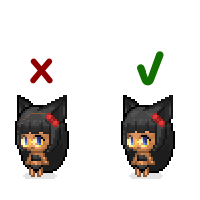
To fix all these issues, the way I’m doing things now is dynamically generate the entire character spritesheet once, store it in memory and use a simple state machine to decide which sprite to display. So instead of doing this stacking and palette swapping work once every frame, I do it once upon loading the character, then use the resulting spritesheet as-is until I need to refresh it (for example when you change your character’s outfit). This is a lot less resource-hungry, and by using a single “solid” sprite instead of a stack I don’t have these sub-pixel problems anymore, so the sprite should always come out clean.
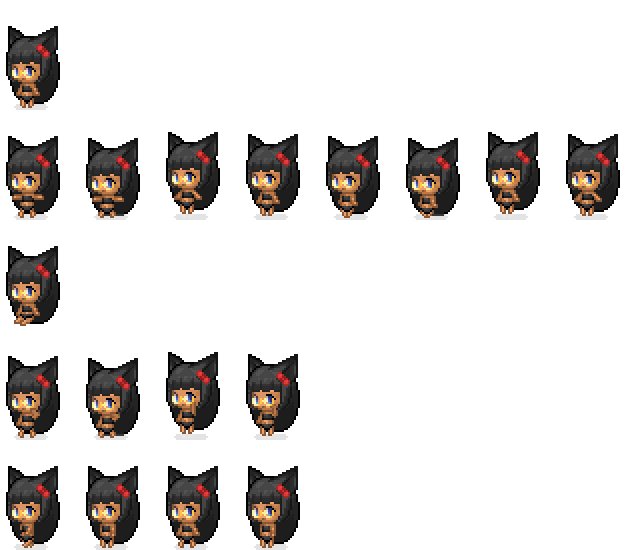
And that’s pretty much all I have to report. As I mentioned at the start of the post, my job has been hogging a lot of my free time lately, so I don’t have a lot left to work on personal projects. We’re basically in our last straight line before releasing a massive project and let’s say we are not really on time… So I don’t expect to have much free time until September/October. I’ll still try to keep one or two evenings a week dedicated to my projects, but you can expect a few months of very slow progress… I apologize.
23 Likes
Hey no worries about your IRL job taking up your time. It’s something that can’t be helped. I’m sure everyone here appreciates the effort and passion you’ve put into the game during whatever free time you can manage to scrap up. This will always be one of my favorite projects on this site!
2 Likes
this is really fun to mess around iwth, and the art is great. would love to see a buy multiples button in the future too
nice. the little chibis will appreciate getting to wear clothes I’m sure
2 Likes
The fact that you’re doing anything on this at all alongside your normal job is amazing to me! Make sure you don’t burn yourself out!
4 Likes
could you add a fart option in the slob settings