Game release "Mysterious Corridor" an exploration 3d game (fix for instant crashes OUT!)

Greetings all,

I have been a long time lurker (for many years! But not a long time community member), I have enjoyed many games that I have found through this site, but having been around for a long time, one type of game I feel like I have not seen a lot of are 3d games, and so I decided with the help of a little nudge from someone in the community that I could give it a try myself, so I decided to learn unreal-engine and here is my first attempt at a simple project.

The game revolves around a simple gameplay loop where you the player wakes up naked in what looks to be a rundown and abandoned place, and must then explore to look for a way out and learn what is going on. As you explore you will encounter Larry and Natasha, and Larry will fill you in on the details, as you and Natasha will play a game of chance, wherein you explore the corridor to find a strange “agent” that you must choose to either give to Natasha or take yourself, there being a 50% chance that the agent either has an effect or does nothing.

The game has a couple additional features that I added in as most of this project was about me learning unreal engine, hence the gameplay loop here is rather simple, for players that don’t want to engage with the random chance part there is a cheats option you can enable from the main menu, additionally you can choose which type of “growth” or “content” you want to see from a list in the menu consisting of “weight gain”, “pregnancy” and “breast + ass expansion // hourglass expansion”. In addition there is a special unlockable game mode which…
spoilers: will allow you to choose between playing against Larry or Natasha in a game where the agent does a combination of all 3 content choices.
How to unlock the “special game-mode”: seeing all 3 types of content as well as seeing the player win and lose (i.e. 5 distinct things you have to see).

If you are here for male transformation only or you are not interested in one of the content types or similar but want to see the “special game”, I did add a way to cheat unlock the button to start the “special game-mode”: To unlock it in the cheaty way simply click with the mouse in the bottom-left corner of the screen a few times.

This being an unreal engine game and my first one at that, I did have to spend a while performance optimizing, but I think at the stage its at now as well as with the possibility of changing the graphics settings it should run on most systems, an RTX enabled system is recommended though. Also I could not get the game size lower than 1.3gb even through my optimizations, unreal inefficiencies and my lack of experience there, I have some room for improvement.

Since gen-ai is a big focus I’ll just mention that gen-ai has been used in this game mostly related to me learning the engine so some debugging assistance (however as my game is made in blueprints none of the actual code is made by gen-ai since gen-ai cannot create that). Secondly the game has some kind of “tidbits” or “comments” that pop up during the game, and as I had to write quite a few of those, I did use gen-ai to assist me in coming up with some of them mostly for inspiration. (specifically for those I barely used them and I heavy-handedly edited them so I regret that they now force me to put the tag, but fair is fair :slight_smile: ). That being said none of the visuals or sound design have any relation to AI.

Here is a link to the game’s itch io page:

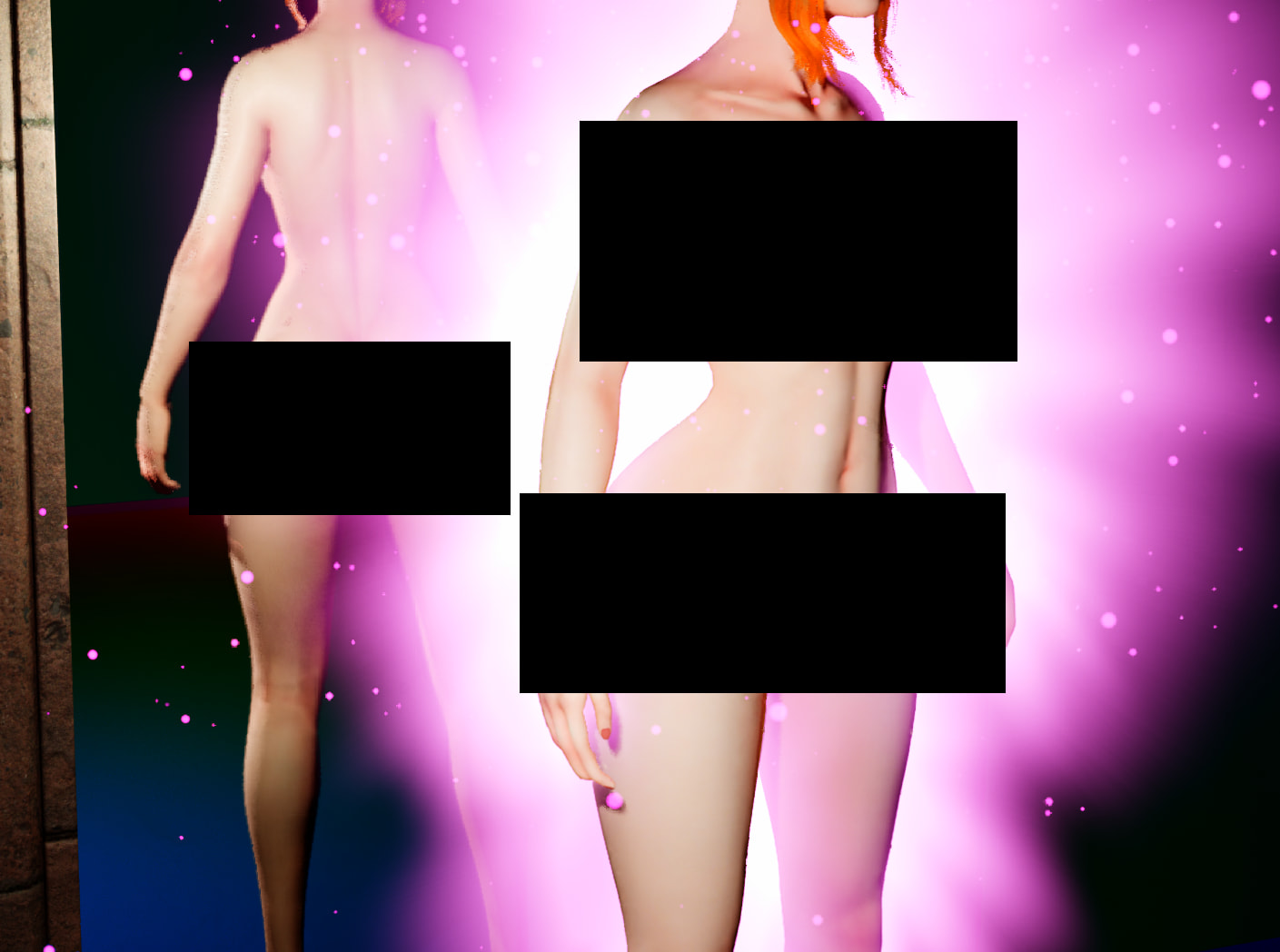
And I’ll share a screenshot from the game’s “transformation” cutscene, here featuring the player character getting transformed:
I would consider this game as released but one thing I’ll mention is a slightly annoying dialogue system bug that I couldn’t quite make friends with, so if you are unable to progress dialogue you will have to exit the interaction prompt and reenter (sorry about that, I could not fix it :frowning: )

Feel free to share some feedback or suggestions about the game, if I have missed some glaring bugs I can most likely patch those out but I would consider the game released and I am not actively developing it further, if you have a great idea though feel free to share, I’ll most likely make another project down the line so I am open to suggestions.

Edit: Released bugfix version 1.1 which removes a secondary potentially problematic post processing effect near the mirror which was reported to cause crashes, and added support for additional shader models.

Warm regards
Pachebel

10 Likes

this looks promising since i cant name lot of 3d weight gaining games let alone ones in unreal engine, could we maybe see some gameplay? and also how big do the characters get? are we talking lot or just chubby weight gaining.

Im able to start the game and it runs fairly well but when I get to a certain corridor it crashes. Its past the this way help sign. It doesnt crash before that or have any signs that something is wrong before getting a fatal error.

This could potentially have to do with the fact that it uses a different post processing effect at that location. Essentially I am using a trick at the location of the mirror to save some performance costs, but it might be that is causing an error, I am not sure if other users have had this issue, I’ll add a poll here, if other users seeing this could vote if they had this bug that would be appreciated as I could deploy a bugfix just removing this post process zone potentially. Are you on a windows system?

  • I have had this crash at the “this way” sign
  • I did not experience this crash
0 voters

Are you making any more games in Unreal? I quite enjoyed this game and would enjoy more content of a similar nature ^_^.

I can check if I am able to add a small video to the itch page to show the gameplay, size-wise, the game utilizes “morph targets” that scale with a variable, so essentially I have sculpted the characters for what they look like at a value of 1.0, which can be reached during a natural play session, and I would say that maybe corresponds to somewhere between 100-110kg or 220-250 pounds, however in the event of a tie, Larry will restart the game meaning you can reach larger sizes, however the characters and animations may start to look a little weird if this variable goes too far above 1.0.

Short answer is yes, but it’s going to take a long time.

seems to crash after starting the game (mainly after loading everything in.. it seems to need some optimization for low end pc’s)

Yeah it will most likely not do well on lower end systems. Have you tried lowering the quality and turning off reflections in the settings?

not yet ill try tough

edit: nope the shaders cause a fatal error you kinda have to redo them

I can also confirm that the game immediately crashes for me.

I have uploaded a new version 1.1 which adds support for additional shader models, the engine should select automatically based on your system hardware, I hope this would fix your issues where the game crashes immediately on load as hardware incompatibility with the shader model is one thing that could cause that.

Regarding version 1.1 I’ll add a poll again to get an idea of whether this improved anything. I’ll appreciate your responses on this.

  • Version 1.0 worked for me but I now crash/have problems on 1.1
  • I had the crash at the “this way” sign before and that is now fixed
  • I never had any crashes and still don’t on 1.1
  • I am still crashing at the “this way” sign
  • I had immediate crashes before but that is now fixed
  • I had immediate crashes and still do on 1.1
  • I am crashing at the first transformation cutscene (possibly related to “this way” sign crash)
0 voters

For me to be able to understand what is causing the immediate crashes, if one of those of you that are experiencing these crashes could check if you have some files in the “Crashes” or “Logs” folder on this location of your pc: “C:\Users\USERNAME\AppData\Local\MCorridor\Saved”, if you would be able to send me a private message with one or a few of those files that would help.

The new update worked for me. I had no issue finishing the game.

1 Like

I’ve never used Unreal myself so I can’t be sure, but this game has a lot of lighting noise and artifacting, likely due to Lumen. I’ve no idea how you would fix that but it is something I’d recommend you look into, because even with the graphics settings at their maximum this is still very fuzzy and flickery. Adding an FPS cap option would also help with performance for those with weaker PCs.

The problem does center around lumen and in particular the combination of ray traced reflections, nanite and lumen is what is causing the flickering, essentially nanite allows the game to render high resolution textures at much lower processing costs but nanite reevaluates the “triangulation” at movement which paired with lumen which computes complex lighting including indirect lighting and lighting reflections makes light bounce off the textures making the flickering effect. The least amount of flickering you can get in the game will be if you turn off reflections and use either temporal anti aliasing (TAA) or temporal super resolution anti aliasing (TSR). There are ways to improve it but I would have to build a whole system around it since you essentially have to increase the amount of light bounces which significantly increases gpu cost. For a future game I will want to do that but given the amount of extra work needed at this point to fix that in this game I had decided to leave it how it is.
Regarding adding an FPS cap, that is a good idea though and something I can do fairly simply so I’ll probably add that to a future bugfix patch.

I have released version 1.2 today, which adds an option to reduce or “fix” the flickering at the cost of GPU processing, so should only be used on high end systems most likely, additionally I added a frame rate limit and an optimize settings button that lets the engine try to set all user settings including ones I have not exposed based on a hardware scan it will run on your system.

I would’ve liked to make a more targeted fix for the instant crashes but I did not receive any log files from anyone, I am not sure if that is because they don’t exist where I thought they would or at all potentially (since unreal doesn’t really produce log files in shipping builds that might be the case). As such I am not really expecting this update to fix the instant crashes but there is a chance of course, in case anyone whose had instant crashes give it a shot I’ll add a poll.

Also, I did add a small little gameplay video to the page and also the files are no longer hosted at mega but instead available directly on the page.

  • I had instant crashes on 1.1+1.0 and they are now fixed
  • I had instant crashes on 1.1+1.0 and still do
  • I never had crashes and still don’t on 1.2
  • I never had crashes, but now on 1.2 I do (please report)
0 voters

Someone kindly shared a more detailed error log of the code from the instant crashes, based on that code and what I can research I believe the issue may relate to compatibility with directx12, and it seems like even though directx11 is enabled, the game is choosing directx12 regardless.

If you are someone who are experiencing these instant crashes I would appreciate if you are able to test if the below fixes it and to let me know :slight_smile:

  • Right click the MCorridor executable and select create shortcut (on windows 11 this option may be under show more options at the bottom)

  • Right click the new shortcut and select properties

  • In the target window add a space at the end of the code that is already there and add “-dx11”, so it should look like …\MysteriousCorridor-windows-1.2\MCorridor.exe -dx11

  • Press apply and ok and then launch the game from this shortcut file.

1 Like

Worked for me.
That is such a weird issue to run into.

1 Like

Thanks for letting me know, I have uploaded this shortcut file to the itch page so users can just download that for convenience.

Simply unpack that shortcut file into the main game file and run the game from this file to make it work.

More details in this itch io post:

2 Likes