Hi there!
I hope I’m making a correct use of categories, tags or content in general since this is my first post here.
I’m a 2D/3D artist and I’ve been recently trying to find out a good way to make a fat character via shape keys to animate wg sequences and other content related to the wg/stuffing/inflation concept. I had some tries but any of them look decent. So I’ve came here to ask for advice or any kind of help.
Does anybody have advices? Or any other learning resources like a related tutorial video from any site or forum, downloadable models with programmed shape keys to learn or any other learning reources.
I’ve been looking for stuff to learn about wg and inflation in blender but it’s really hard to find tutorials, good anatomy references or any other thing to learn.
So any help is welcome!
Here’s an image of my first try doing it, with a quick view of the reference image I’ve used and the base character (My Own Character)
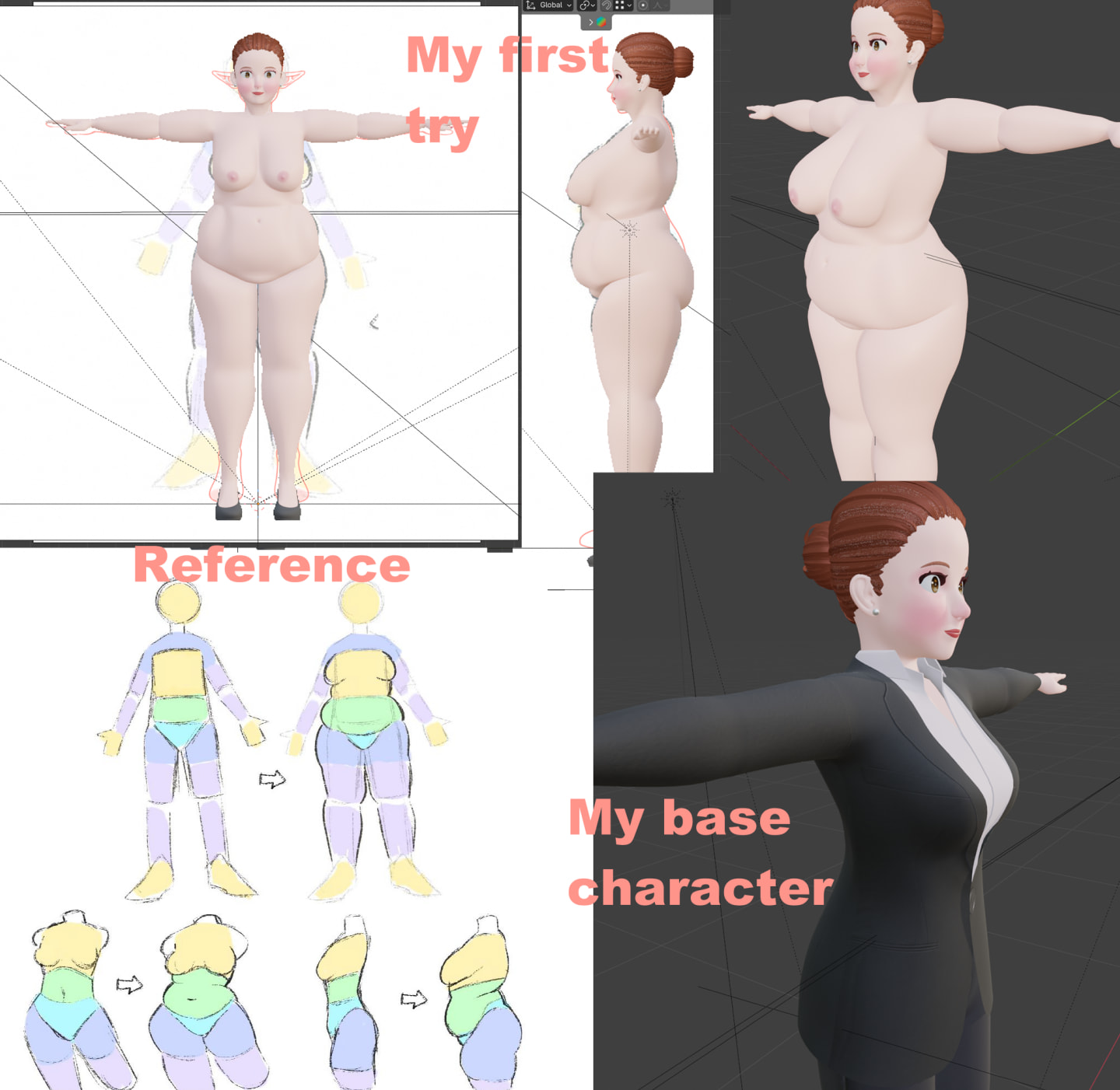
I’ve chosen this character since she’s the simplest one I have in terms of design (like no long skirts or dresses which have lots of bones with constraints), simple hair, etc
Anyway, I hope I can find help here since this is the only wg place I know with a category to help other users with their related works. So I hope I can post good quality content in the future!
You can talk to me in the comments, DMs or asking me my Discord.
Thanks for your help and have a nice day!
Hi, first of all thank you for replying to my post. Also, should I need Normal maps for WG stuff? I've only used normal maps for clothing since my art style is like... Semi realistic (a mix between realistic body traits and anime style), but I would like to improve with time, I've started learning blender around 1.5 years or so, I'm learning really quick but as you can imagine there's still a lot of tools I've never used or figured out how to use them. But that's a matter of time Also, I've been thinking on making normal maps to simulate cellulite and other marks on the body Thanks!
– OnlyPixelsFor normal maps, lets say the mesh must remain mid poly, so at any point the mesh would fold into itself, you could keep it mid poly as a kinked curve and sculpt the fold then bake the normal map. When viewed, the mesh will appear with a deep fold but the model is just a kinked in curve. They used to do this for like, butts, but with modern gpus nobody cares anymore and the whole butt is modeled and normal mapped. You already got a good grasp of the other ways to use normal maps.
– ORDER69