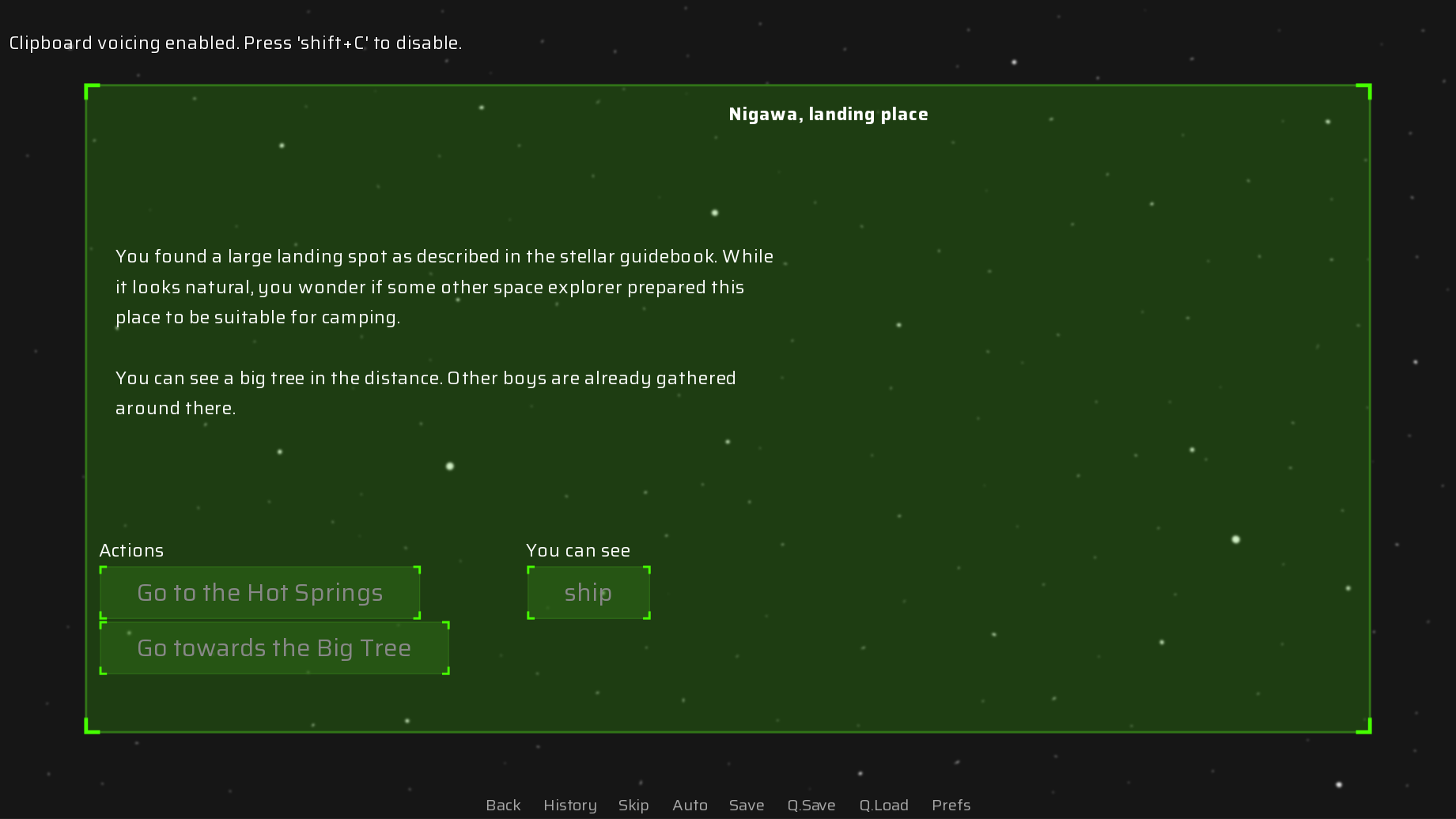
I’ve been learning to draw for a while in order to make games and thought that I would get better at creating UI as I improve my art skills in general. I was wrong.
So I tried to look for some tutorials but the only ones I come across are for designing UI that’s easier to navigate, not how to make it look well (except for pixel art, which won’t fit the rest of my game). Anyone has some tips on how to approach it? Links to articles I should read or tutorials I should watch?
For my current project I’m specifically trying to create a futuristic UI.
A youtube channel by the name of Design Doc has a series of videos called good design/bad design that goes over UI/UX and graphics design in video games. Might be useful for some inspiration. Synty also has quite a few UI packs that I have found useful in myself that may be worth checking out..
It’s not a tutorial, but I’ve been using Figma for my game. It’s really straightforward and you can get some rather clean results with little experience. I’m admittedly terrible with UI stuff but I used Figma’s color palette generator to pick a color scheme then used those colors for all my shapes and ended up with a cohesive end product.
It’s worth checking out if you want something quick and easy while you focus on the rest of your game. https://www.figma.com/
Thanks for the suggestion. The mention of using a color palette reminded me of a great tool I used a couple of times in the back: https://www.colourlovers.com/. They host user-created color palettes, and you can find something nice by playing with keywords.
As for figma, I’m weary of using anything that’s not open-source. I don’t want to be in a position similar to adobe users in a couple of years…
So i would like to ask an extension question, which is its great to go from no artistic ui concept to a beautiful ui concept, but as i have found going from beautiful ui concept to reality is not always so clean… I would also take any advice/resources/tools for turning you nice design into a working ui.
Well, I’m restricted to what Ren’Py can do. So I’m pretty focused on making it usable as well.
I’m also not that ambitious. I just want something that’s not offensively bad. I think simple “hologram screens” would do all right. However, this is how it come out…
You may already know this, but on the off hand you don’t, Ren’Py has the ability for custom displayable, if your willing to get your hands dirty with some python your actualy free to render whatever you like, so as long as your rendering code in python does not overwhelm the single python thread, and move away from the built in Ren’Py SreenLanguage primitives. Also probably the best way to define new custom displayable is via custom gl fragment shaders, so you define a custom displayable rendered with your new shader, an presto new shiny displayable. The gatekeeping on this is learning python, glsl(for the shader), and reading the renpy documentation for how to inherit the displayable baseclass and implement it so you can use it in your game. The nice part about a shader is your ofloading the rendering to the gpu vs doing cpu based rendering.
Also there are quite a few plugins that provide custom displaibles for use without the hassle of having to make them first.
Yeah, I know about this. Reading the source code of a project I’m using is one of my favorite forms of procrastination, LOL. GLSL is long standing on the list of things I’d like to learn and I think it’ll be nice for some mini-games (or maybe a classical JRPG world map). If I’ll need to replace Ren’Py’s regular displayables though, I think I’ll just use Löve instead and work with a clean base.
However this time, I’d like to get something done. So I’ve forbade myself learning this BEFORE I actually finish a couple of smallish projects.
My go-to for improving my UI (and all of my art) is references. I sometimes browse the Game UI Database to see what layouts and details I’d like to adapt to my projects (https://www.gameuidatabase.com/index.php?&tag=63 filtered to futuristic games). For instance, I noticed some games with hologram screens have a faint glow effect on their text or have scan lines across everything. You can experiment with those or maybe try another futuristic UI style you like the looks of.
(You’ll also see that alignment is a big part of futuristic and other UI. While I don’t know how finalized your screenshot is, having the location name be center-aligned and the description and Actions share the same left alignment would be an improvement.)
Animation and sounds also play a big part in elevating the UI. Hearing a computer beep or keyboard click when you select options could be a simple way to sell the UI better. Some animations might not be worth the time if you’re doing small projects for now, but something to keep in mind.
Hey, that sounds good, but I’m looking for something more basic. For example, I noticed the glow, I just simply don’t know how do I make a sprite look like it’s glowing.
I’ve put this problem on the side for now, so I haven’t researched anything since I made the original post, but I think I’m actually looking for a tutorial/cookbook with basics of creating HUD elements.
If I won’t find something better, I am going to try making a design of how I’d like everything to look first and then making images in the format that Ren’Py can understand.
Open gl shader! Make a shader that applys a glow effect to the sprit, what that exactly means is up to you is it a halo of light around the sprit, or brighten the sprite, or both, or something completly different. The link i sent you show where once you have your shader and you use it via the transform keyword. from the shaders documentation:
transform gradient:
    shader "example.gradient"
    u_gradient_left (1.0, 0.0, 0.0, 1.0)
    u_gradient_right (0.0, 0.0, 1.0, 1.0)

show eileen happy at gradient
so they oviously did a gradinet effect, but you make a shader taking in some uniforms to define your glow effect and you would have:
// this transform is a specific use of the shader with predefined uniforms
transform glow:
    shader "example.glow"
    u_glow_driction (1.0, 0.0, 0.0, 1.0)
    u_glow_intensity 1.0

// apply transform to sprite
show mysprite at glow
transforms can have a time factor so if you notice you can have a time factor in the shader, to give a pulsing effect!